AI Agents
What Are AI Agents? Agents vs Chatbots vs Workflows
A clear explanation of AI agents, how they differ from chatbots and fixed AI workflows, when each one fits, the risks to plan for, and how to start.
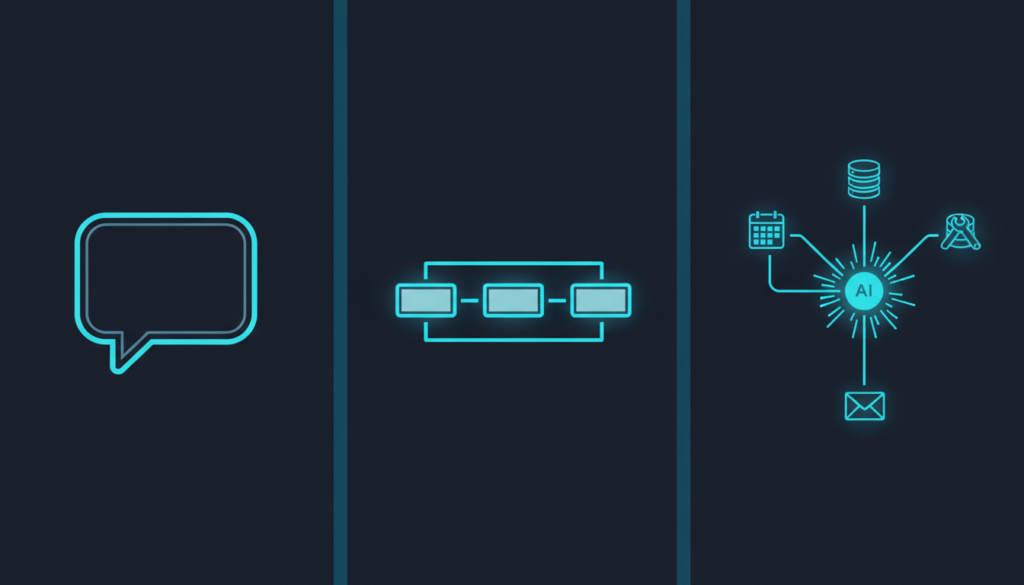
In shortAn AI agent is software that uses a language model to decide its own next steps, choosing which tools to use and when, until it reaches a goal. A chatbot answers questions. A workflow runs AI through fixed steps you define in code. Agents are the most flexible of the three, and also the hardest to make reliable, so many business problems are better solved with a workflow.
Three ways to put AI to work
Most articles compare chatbots with agents. In practice there is a third option in the middle, and it is often the right one. Anthropic draws the same line in its engineering guide Building Effective Agents: workflows are “systems where LLMs and tools are orchestrated through predefined code paths”, while agents are systems where the model dynamically directs its own process and tool use.
| Chatbot | AI workflow | AI agent | |
|---|---|---|---|
| What it does | Answers questions in conversation | Runs a task through fixed steps, using AI at some steps | Decides its own steps and tools to reach a goal |
| Who controls the path | Script or model, within a conversation | Your code | The model |
| Takes actions in other systems | Rarely | Yes, in the order you define | Yes, in the order it chooses |
| Predictability | High | High | Lower |
| Best for | FAQs, routing, simple support | Repeatable processes: document intake, reports, ticket triage | Open-ended tasks where steps vary each time |
| Example | “How do I reset my password?” | Read each invoice, extract fields, check against the order, flag mismatches | “Find out why this customer’s order is late and fix it” |
How an AI agent works
An agent runs in a loop:
- Receive a goal, for example “reschedule Thursday’s client meeting to next week”.
- Decide the next step using the language model.
- Use a tool: check a calendar, search a database, call an API, send a message.
- Read the result and decide again, until the goal is met or it needs a human.
The tools are what make an agent useful. Standards such as the Model Context Protocol (MCP) now let teams connect agents to internal systems in a consistent way, instead of writing a custom connector for every tool.
When to use each one
- Choose a chatbot when people mainly need answers or directions.
- Choose a workflow when the steps are the same every time and you need predictable, auditable results. This covers a large share of business automation.
- Choose an agent when the steps genuinely change from case to case and a person currently has to investigate before acting.
Anthropic’s advice is to find “the simplest solution possible, and only increasing complexity when needed”. In practice: start with a single model call or a workflow, and move to an agent only when the simpler design cannot handle the variety of real cases.
When not to use an agent
- The task has strict rules and a fixed order, such as payroll or regulatory reporting. Plain code or a workflow is safer.
- Mistakes are irreversible or expensive, and you cannot add a human approval step.
- You cannot test the agent on enough realistic examples to trust it.
- The volume is too low to justify the build and monitoring effort.
Risks to plan for
- Wrong actions. A model can misread a situation and act on it, for example emailing the wrong customer. Give agents the fewest permissions they need.
- Prompt injection. Text inside an email, web page or document can try to instruct the agent. Treat everything the agent reads as untrusted.
- Loops and runaway costs. Set limits on steps, time and spending per task.
- Silent failure. Log every step and tool call so you can see what the agent did and why.
The most important safeguard is a human approval step before anything irreversible: refunds, payments, deletions and messages to customers.
What agents cost to run
Agents usually cost more to run than chatbots or workflows, because each task involves several model calls and tool calls. Budget for model usage, hosting, monitoring and someone reviewing failed tasks. Our guide to the cost of building an AI agent for customer support breaks this down in detail.
How to start
- Pick one process where people currently investigate and act, and where volume is meaningful.
- Collect real past examples with known correct outcomes.
- Build the simplest version that works: often a workflow with one AI step.
- Test it against your examples, add human approval for risky actions, and pilot with a small group.
- Add agent-style flexibility only where the tests show it is needed.
Frequently asked questions
Is ChatGPT an AI agent?
A plain chat assistant is not an agent. When an assistant is given tools such as web browsing or access to your files, and decides by itself when to use them to complete a task, it behaves as an agent.
Can a chatbot be upgraded to an agent later?
Yes, if it was built on a language model with clean connections to your systems. Adding tools and permissions turns it into an agent, but it then needs the testing and safeguards described above.
Do AI agents replace employees?
In most businesses today, agents take over repetitive investigation and admin work, while people handle judgment, exceptions and relationships.
Related reading
- What Generative AI Can Actually Do for a Business
- API Design Best Practices, which matter for any system an agent connects to
Explore AI agents for your business
VisionColab designs AI workflows and agents that connect safely to your systems. See our AI agent development services or book a free consultation.
Written by the VisionColab team
VisionColab designs and builds AI, web, mobile and cloud software for businesses. Our guides explain the decisions, costs and trade-offs involved in planning a software project.