Artificial Intelligence
What Generative AI Can Actually Do for a Business
A grounded look at where generative AI delivers value in a business today, where it does not, and how to pick a first use case.

In shortGenerative AI is most useful for turning messy text into structured data, summarizing, drafting, answering questions from your own documents and routing requests. It works best when a person or a rule checks the output before it matters. Pick a first project that is frequent, easy to check and easy to measure.
Generative AI can write, summarize, translate, classify, extract and answer questions in ordinary language. That makes it useful almost anywhere people handle text, documents or customer conversations. It also makes it easy to start projects that never deliver value.
This guide separates the uses that reliably work from the ones that need care, and gives a simple way to choose a first project.
What generative AI is good at
Large language models predict likely text based on patterns learned from huge amounts of writing. In practice, that gives them five strengths businesses can use:
- Turning messy text into structure. Pulling fields from emails, contracts, invoices or support tickets into a database.
- Summarizing. Condensing long documents, call transcripts or ticket histories into what a person needs to know.
- Drafting. First versions of replies, proposals, product descriptions and reports for a person to edit.
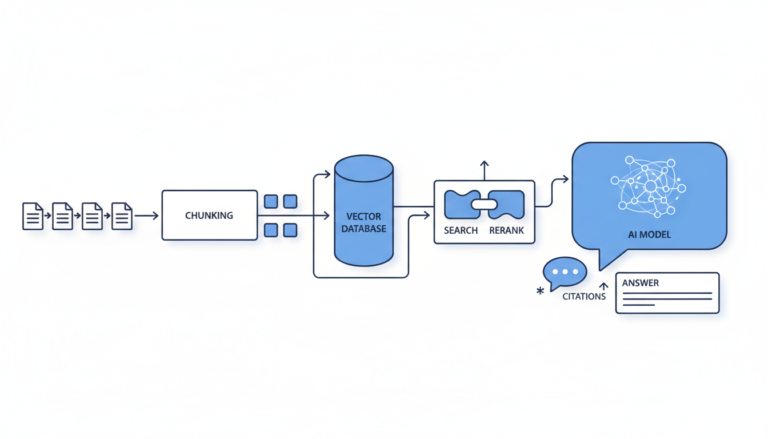
- Answering questions from your own content. Searching internal documents and giving an answer with a link to the source.
- Classifying and routing. Sorting incoming requests by topic, urgency or sentiment so they reach the right team.
Where it creates value, by department
| Team | Practical use | Why it works |
|---|---|---|
| Customer support | Suggested replies, ticket summaries, self-service answers | High volume of similar questions with known answers |
| Sales | Call summaries, CRM notes, first-draft proposals | Saves admin time; a person still owns the relationship |
| Operations and finance | Extracting data from invoices, orders and forms | Replaces manual data entry with checkable output |
| HR and internal support | Answering policy questions from the handbook | Questions repeat; answers exist in documents |
| Product and engineering | Code assistance, test generation, documentation drafts | Developers review every output before it ships |
| Marketing | Variations, translations, briefs and research summaries | Speeds up drafts; editors keep quality and accuracy |
The pattern is the same in every row: the model does the repetitive first pass, and a person or a rule checks the result before it matters.
Where it needs care
- Facts without sources. Models can produce confident but wrong answers. Ground them in your own documents and show the source.
- Calculations and exact numbers. Let traditional software do the maths and use the model to explain the result.
- Decisions about people. Hiring, credit, insurance and similar decisions carry legal obligations in many countries. Keep a human decision-maker and document how AI is used.
- Confidential data. Check where data goes, how long the provider keeps it, and whether it is used for training.
- Unsupervised publishing. Content sent to customers without review can damage trust quickly.
How to choose your first generative AI project
Score candidate ideas on four questions. The best first project answers yes to all of them.
- Is the task frequent? Something done hundreds of times a week beats something done once a quarter.
- Is the output easy to check? A summary a person skims is easier to validate than legal advice.
- Is the information available? The documents or data the model needs should already exist.
- Can you measure the result? Time saved per task, tickets resolved or errors reduced. Measure before and after.
Internal tools are usually a safer start than customer-facing ones. Your own staff can tolerate and report mistakes while you improve the system.
Buy, configure or build?
- Buy when a tool you already use offers the feature, such as AI summaries in your helpdesk or meeting software.
- Configure a general AI assistant with your documents when the need is internal question answering.
- Build when the AI must work inside your own product or connect deeply to your systems, data and approval rules.
Frequently asked questions
Do we need our own AI model?
Rarely. Most business applications use an existing model and connect it to company data. Training a model from scratch is only justified for very specialized needs.
How do we stop the AI from making things up?
Give it the right source material for each question, ask it to cite that material, test it on real examples, and route uncertain cases to a person.
Are there rules about using generative AI?
Yes, and they vary by market. In the EU, the AI Act includes transparency duties for systems that interact with people or generate content. Check the rules for every market you serve.
Further reading
Find the right first use case
VisionColab helps businesses scope and build practical generative AI tools. See our AI development services or book a free consultation to review your ideas.
Written by the VisionColab team
VisionColab designs and builds AI, web, mobile and cloud software for businesses. Our guides explain the decisions, costs and trade-offs involved in planning a software project.